
Check Google From All Over The World With this SEO Chrome Extension.
No VPN required.
100% free and private.
Updated to V2. Firefox Extension coming soon!
Search Like a Local
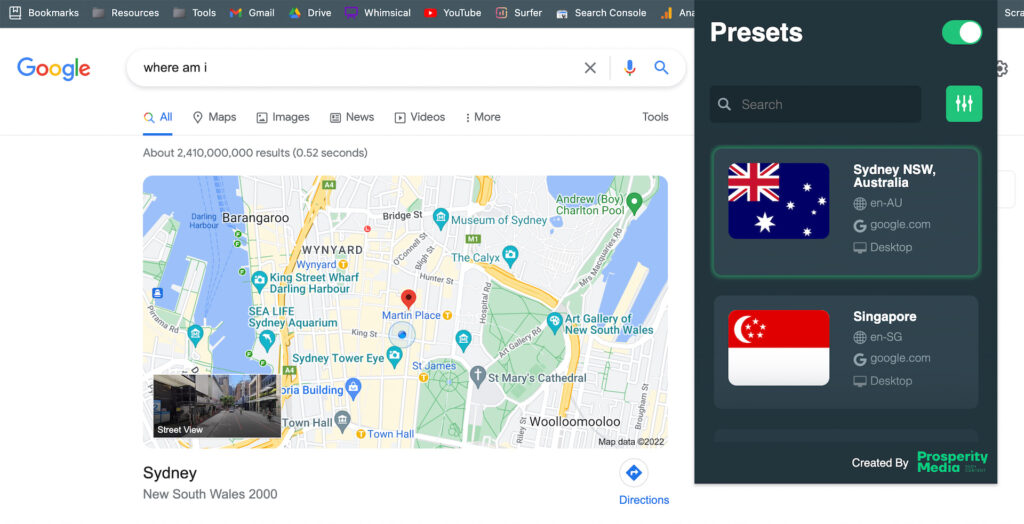
Prosperity SEO Extension lets you search like a local without leaving google.
You can do accurate SERP analysis, see if your HREFLANG is actually working, and quickly check local rankings.
It also works in Google Maps & incognito mode to remove SERP personalisation.
How It Works
It’s really easy to use. Just follow these steps:
1) Enter Your Settings
You can change your location in Google Chrome by searching adding a preset address.
2) Select An Active Preset
You can have multiple presets and select the one you want to be active.
3) Flick The Switch
Flicking the switch on activates the plugin and changes your location while inside Google Chrome.
Search Presets
If you have many presets, it can get cumbersome. That’s why we’ve created search functionality at the top of the plugin.
Delete Presets
You can remove presets by selecting the preset and pressing “delete” on your keyboard.
How To Install The Plugin
Installation is very quick and easy. Just follow this video:
Get Your Free API Key
You’ll need an API key to use this chrome extension. The good news is it’s free. Watch this quick 2 minute video on how to do it:
Here’s the link to Google Cloud Platform Console:
https://console.cloud.google.com/
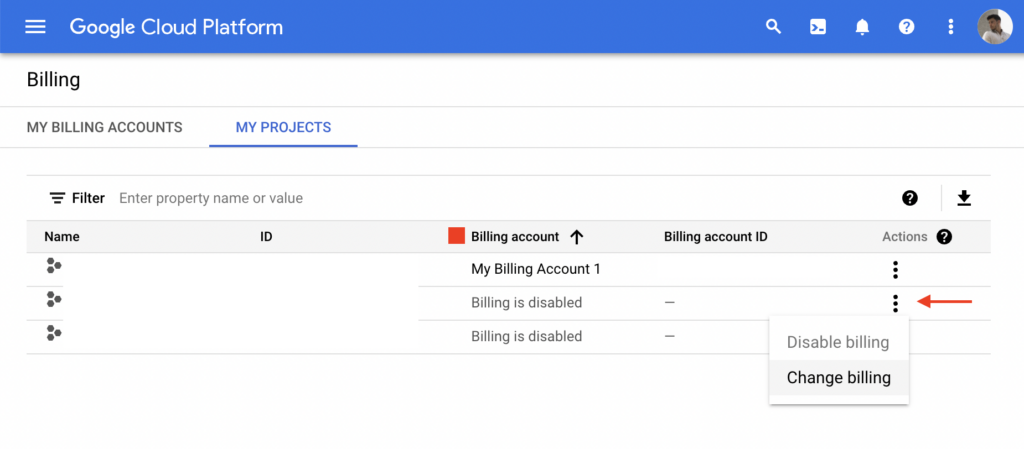
NOTE: You MUST link a billing account to your project or Google won’t let you use your API Key.

To make sure your billing account is linked to your “serp checker” project go to:
https://console.cloud.google.com/billing/projects
Click on the 3 vertical dots -> Change billing -> Add your linked billing account
Geocoding API is a part of the Google Maps API. Google gives you a $200 credit each month which means it’s free. You would have to add tens of thousands of location presets every month to blow through your free credits which is pretty much impossible.
If Google decides to remove this credit in the future, they use a pay as you go model. Google would charge you a one time payment .005 USD to add 1 location preset or .05 USD for 10 presets. That’s 5 cents.
If you want more information about API limits and pricing please see this page.
Frequently Asked Questions
Why Isn’t This On The Chrome Webstore?
Chrome only allows manifest V3 plugins to be uploaded. Manifest V3 cripples chrome extensions and their ability to intercept requests. This plugin intercepts Google search requests only and replaces an x-geo cookie. The x-geo cookie makes Google think you’re in another location. The dev community is up in arms about this latest MV3 update, especially devs who create ad-blockers for chrome. Ad-blockers use and rely on this intercept request module to function as well.
Does This Track My Data?
No, this plugin is 100% free and private. No tracking or upsells.
Does This Work On Firefox?
Yes. However, it will not work when in incognito mode on Firefox. There’s a bug where Firefox doesn’t allow you to write to local storage in incognito mode. Therefore the plugin can’t store application state or data.
Final Remarks
If you love the plugin, please feel free to share or link to it from your website 🙂
Changelog
V1 – 3/29/2022 – Initial release.
V2 – 4/5/2022 – Added alert boxes and status bar indicator.